Forum Replies Created
-
in reply to: Videos in top row don't resize on Iphone
Hello,
I recommend you to use the Revolution Slider that is included within the theme main package.
Install it and use it instead of the Codeless Slider. This will resolve your issue.
Let us know.
Regards!
in reply to: place custom codeHello,
I don’t know which chat service have you used before, but i can suggest you to use Drift.com that can be installed directly with a plugin.
Let me know.
Regards!
in reply to: Can the logo be larger than 300px?Hello,
You can change the height that in the same time will change the width automatically to maintain the logo in the right size. If you will try to change only the width the logo will be stretched and will look very bad.
Select the logo and the in the left side you will see Logo Height option.
Regards!
in reply to: Removing SpacesHello,
There are no tricks. I have only re-organized the element in the same row instead of having different row for one section. Also you have to check the padding-top and padding-bottom of the row.
In that case there is a space in the text that need to be removed. I have only changed the visualization from “Visual” to “Text” and removed that space.
Let us know
Regards!
in reply to: Text on the "pay" button does not appearHello,
I have deactivated the Woo button plugin that broke the button. If you want to change the background of the button you need a custom css instead of using the plugin:
#place_order{
 background:#d8a0cf !important;
}

.product_item.style_large .add_to_cart_button, .product_item.style_large .cl-action{
 background:#d8a0cf !important;
}
Let us know.
Regards!
in reply to: Button missing on mobile platformHello:
This is what i see, please check it out again:
Let me know.
Regards!
in reply to: Editing the FooterThis reply has been marked as private.in reply to: TOWER HELPHello,
Yes, let us know how we can help you. Mihaila is available i will pass the ticket.
Regards!
in reply to: Menu desktop and mobile problemsHello,
1. About the menu on the on the right you have to add this custom css L
nav:not(.cl-dropdown-inline) .menu > li > ul.sub-menu {
    top: 22% !important;
	left: 180px !important;
	}
nav .menu li ul.sub-menu li ul.sub-menu {
    top: -16px !important;
}
The submenu to be resolved we will need your wp creds so we can edit the main.js file or you can wait until our next update.
Let us know.
Regards!
in reply to: Issue downloading theme\'s pluginsHello,
Yes this issue normally are showed when you try to install the plugins with the child theme activated.
Please try to activate the original theme and install the plugins after that you can activate the child theme.
Let us know.
Regards!
in reply to: Problem loading products after filterHello,
If you select an brand the items that will be shown are what is included in this category. So if you in total have 17 items and 8 are on the levis category, when you will select the levis cat you will see only the 8 items. After you will click on load more no other items will be shown.
In case there is another issue that i can’t find understand it completely if i don’t see your online link.
Let me know.
Regards!
in reply to: Background color doesn't showHello,
Please go into Specular > Layout > Overall site layout > Change in the Boxed Layout.
After that go to Styling Option > Background and set the color
If you can’t resolve the issue please share with us your wp creds and online link so i can login into and resolve it for you. (fill the profile data)
Regards!
in reply to: Logo Alignment on Responsive/MobileHello,
Please check it out i have added the lines below:
@media(max-width:480px){

    #logo{float:left !important;}
}
aside ul li:after{display:none !important;}
Let us know.
Regards!
in reply to: Hide Page TitleHello,
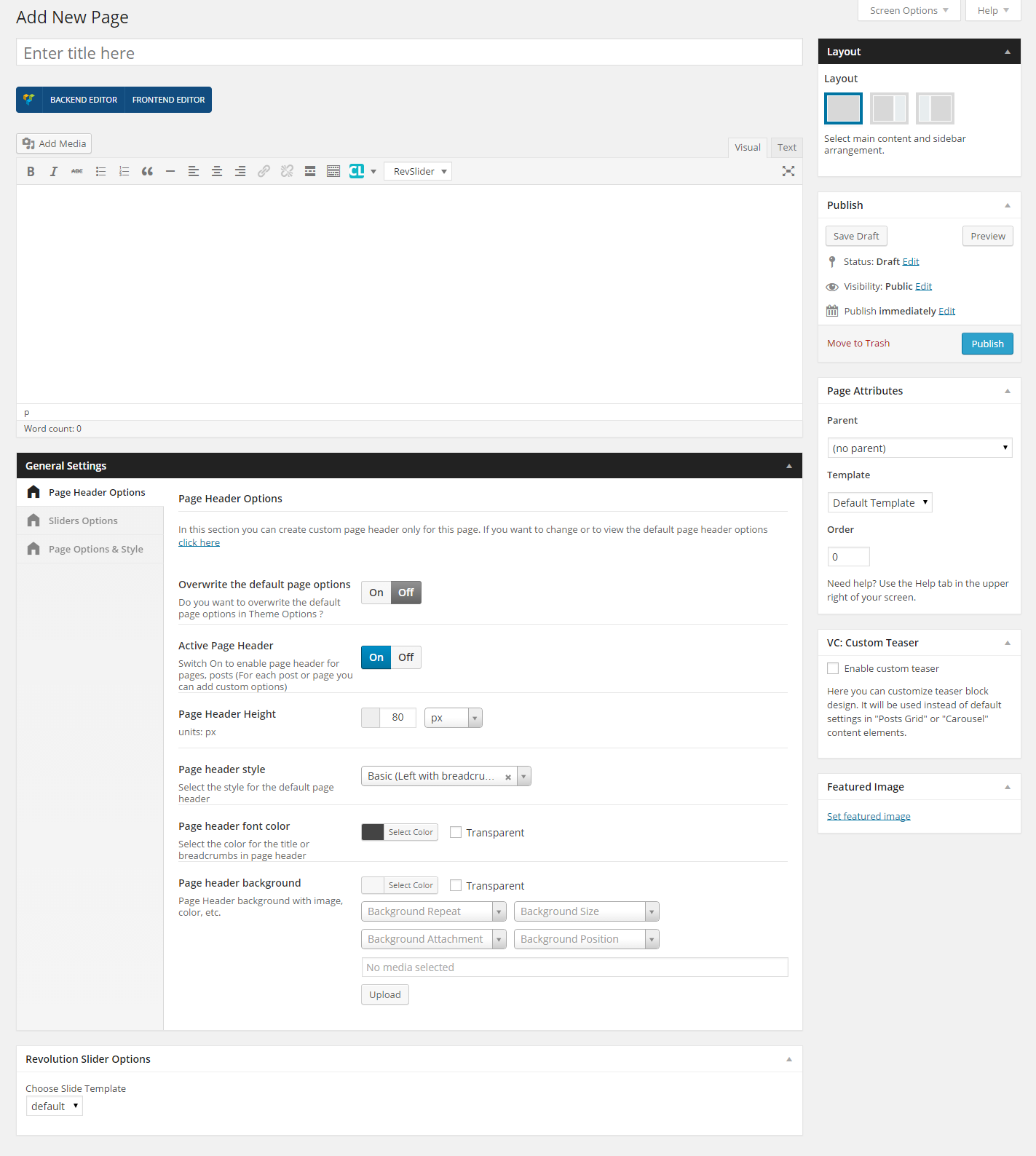
In the post above we are talking about June and not Specular. If you want to remove the page header of the pages on Specular you have to edit the Page and on the Page Header Options you can switch off the option Active Page Header: https://codeless.co/documentation/assets/img/new-page.png
Let us know.
Regards!
in reply to: header / navigation helpHello Rachel,
Please can you share with us your online link so i can give a closer look and find a way to resolve it.
Let us know.
Regards!