Forum Replies Created
-
in reply to: Child Theme Mystery
Regarding updates: For years, I would receive an email from outside (either codeless, or codecanyoun, or specular, or themeforest), though I don’t remember from whom. That email would tell me that an update to the theme specular is now available.
Are you saying that these emails will no longer be sent to me? Are you saying that from now on, WordPress will automatically update the specular them on our wordpress website? Do you have any idea how WordPress generated a message from me to myself saying that Specular was automatically updated?
I never gave wordpress, specular, codecanyon, or envato access to generate outgoing messages from my Outlook email address.
in reply to: Child Theme MysteryI have just gone to https://codecanyon.net/ and downloaded all the PDF statements and none of them show a license number. I do have in my notes, however, that I bought the license on 8 Jul 2016, I bought the regular license that I expect to keep using (no. ending in 61c25ff). Within the wordpress dashboard, is there a way to confirm that this is the license that is being used by the website. I hope the license I accidently bought in January of 2024 would just go away and disappear as a possible download.
in reply to: Child Theme MysteryThanks, What do you mean by going to the “specular home”? Is that Envatomarket, or codeless or codecanyon?
in reply to: Child Theme MysteryRelated question: On 8 Jul 2016, I bought the regular license that I expect to keep using (no. ending in 61c25ff). On 21 Jan 2024, I intended to only buy an extension of support, but accidently bought another regular license that I never intend to use (no. ending in 4aee23).
THREE. Is there a way for me to navigate in the dashboard of wordpress to verify the license number of the Specular theme that is presently running our website?
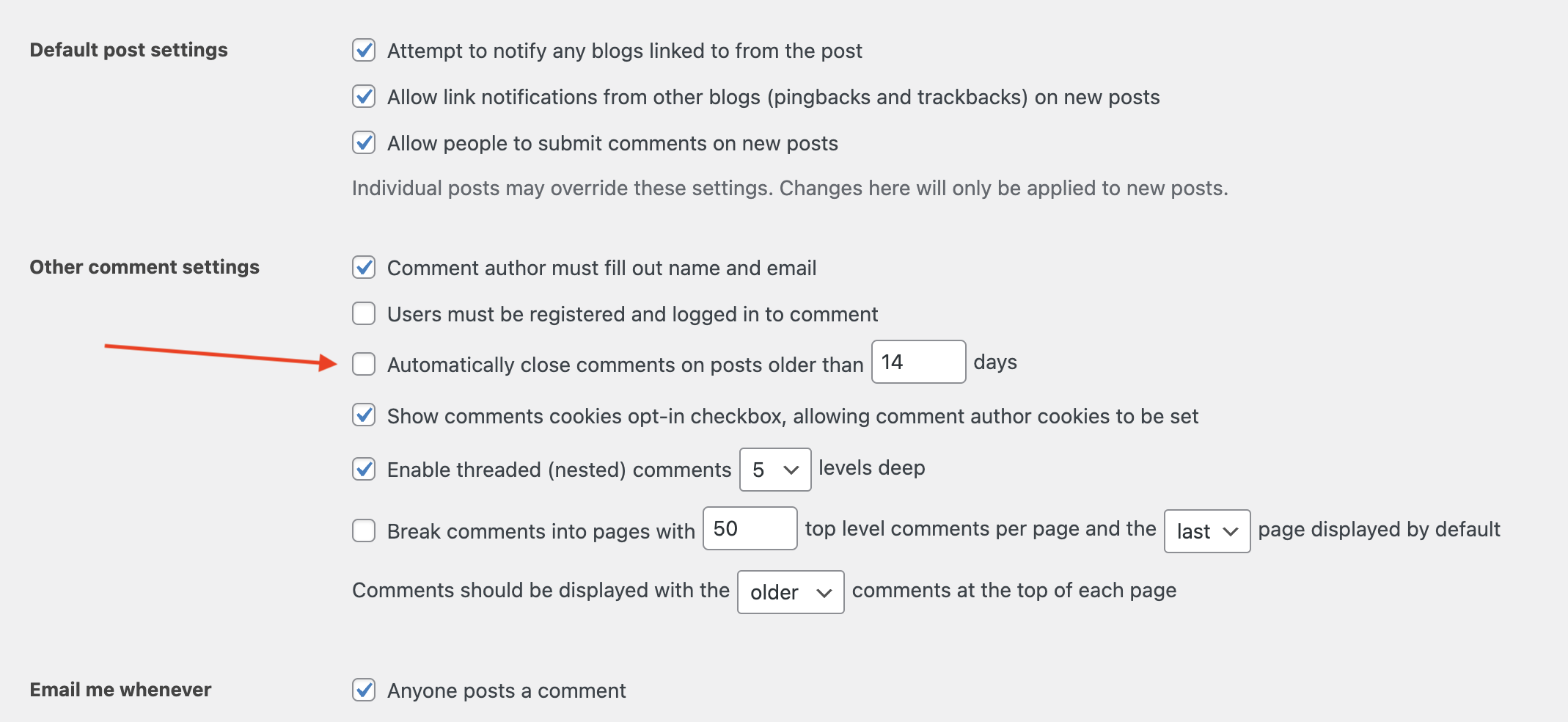
in reply to: Submit comment fields not showingweb developer R.V. showed me how he fixed comments:
“In admin panel, under Settings -> Discussion page, there is setting to disable comments after few days. I just disabled that settings to Comment remains open always.”
see screen shot here:
https://marysadvocates.org/OutsideWordpress/Temp_to_Delete/240410_R.V.fixed_comments.pngin reply to: Submit comment fields not showingThe web developer R.V., who is working on a project for us was able to fix the comments feature so the don’t bread two-weeks (to the minute) after the publication date/time of a post. I asked him to describe how he fixed it so I can tell you.
in reply to: Submit comment fields not showingI just checked now to see if the comments feature is still automatically deactivating (breaking) every time the posts publishing date and time becomes 2-weeks old (to the minute). The problem is repeatable. I saved the source code for both the working and broken posts. See below.
– I(b)
240329_1043-test-comments/ (Post name)
This post was originally written on (March 29 at about 10:43)Test Time April 1, 2024 (12:31)
Create Create Publish Publish Comments
Date Time Date Time Feature
7/29/24 10:43 3/16/24 11:41 broken
3/18/24 12:30 broken
3/18/24 12:35 workingTest Time April 1, 2024 (12:37)
After four minutes, I refreshed the browser and the comments were broken.
Create Create Publish Publish Comments
Date Time Date Time Feature
3/18/24 12:35 brokenI viewed the page source and saved it, both before and after. I named files:
240401_1235_WORK-source_240329_1043-test-comments.txt
240401_1237_BROKE-source_240329_1043-test-comments.txtYou can see/download source code here
WORKING
https://marysadvocates.org/OutsideWordpress/Temp_to_Delete/240401_1235_WORK-source_240329_1043-test-comments.txt
BROKEN
https://marysadvocates.org/OutsideWordpress/Temp_to_Delete/240401_1237_BROKE-source_240329_1043-test-comments.txtPlease confirm whether this is something that WordPress authors are responsible to fix, or is this something theme author fixes?
in reply to: Submit comment fields not showingGodaddy sent me an email telling me to go to my dashboard. The Dashboard shows me this:
“Security Check for 31 March 2024 at 9:40 pm
“WordPress Slider Revolution plugin <= 6.6.14 – Cross Site Scripting (XSS) vulnerability”What do you advise?
-
This reply was modified 2 years, 4 months ago by
 baimac.
in reply to: Submit comment fields not showingI am sharing this exact message with both our them author (azan) and our special project web developer (R.V). Godaddy tech service provided the list below of problems with our site.
Can you tell by looking at list godaddy provided, whether they are issues that would typically be solved by theme author? Or, do I need a specialist to solve them? If they are the kind of thing a specialist would solve, are they the kind of issue that would require specialist to spend minutes/hours doing fix over, and over again, every time a revised version of the theme is updated?
I’ve been having problems with comments. Earlier today, the theme author wrote, “This feature comes with the wordpress integrated within it. The problem has been reported to the main dev team and we will let you know as soon as I get a word from them. Please be patient.”
GODADDY WRITES:
Deprecated: Creation of dynamic property GD_SEV_Plugin::$__FILE__ is deprecated in /var/www/wp-content/plugins/search-engine-visibility/classes/plugin.php on line 19
Notice: Accessing static property codeless_slideshow::$options as non static in /var/www/wp-content/plugins/specular-wpbakery-addons/includes/codeless_slideshow.php on line 44
Deprecated: Creation of dynamic property codeless_slideshow::$options is deprecated in /var/www/wp-content/plugins/specular-wpbakery-addons/includes/codeless_slideshow.php on line 44
Notice: Accessing static property codeless_slideshow::$options as non static in /var/www/wp-content/plugins/specular-wpbakery-addons/includes/codeless_slideshow.php on line 64
Notice: Accessing static property codeless_slideshow::$options as non static in /var/www/wp-content/plugins/specular-wpbakery-addons/includes/codeless_slideshow.php on line 66
Notice: Accessing static property codeless_slideshow::$options as non static in /var/www/wp-content/plugins/specular-wpbakery-addons/includes/codeless_slideshow.php on line 67
Warning: Undefined array key “slideshow_layout” in /var/www/wp-content/themes/specular/functions-specular.php on line 359
class=”home page-template-default page page-id-1069 logged-in admin-bar no-customize-support header_8 fullwidth_slider_page header_shadow_ wpb-js-composer js-comp-ver-7.4 vc_responsive”>Notice: Accessing static property codeless_slideshow::$options as non static in /var/www/wp-content/plugins/specular-wpbakery-addons/includes/codeless_slideshow.php on line 44
Deprecated: Creation of dynamic property codeless_slideshow::$options is deprecated in /var/www/wp-content/plugins/specular-wpbakery-addons/includes/codeless_slideshow.php on line 44
Notice: Accessing static property codeless_slideshow::$options as non static in /var/www/wp-content/plugins/specular-wpbakery-addons/includes/codeless_slideshow.php on line 64
Notice: Accessing static property codeless_slideshow::$options as non static in /var/www/wp-content/plugins/specular-wpbakery-addons/includes/codeless_slideshow.php on line 66
Notice: Accessing static property codeless_slideshow::$options as non static in /var/www/wp-content/plugins/specular-wpbakery-addons/includes/codeless_slideshow.php on line 67
Notice: Accessing static property codeless_slideshow::$options as non static in /var/www/wp-content/plugins/specular-wpbakery-addons/public/partials/sliders_output.php on line 17
Notice: Accessing static property codeless_slideshow::$options as non static in /var/www/wp-content/plugins/specular-wpbakery-addons/includes/codeless_slideshow.php on line 187
Notice: Accessing static property codeless_slideshow::$options as non static in /var/www/wp-content/plugins/specular-wpbakery-addons/public/partials/sliders_output.php on line 49
in reply to: Submit comment fields not showingSTOP.
Do NOT delete all the posts.
Based on my observations, the date the post was originally created is irrelevant. The only characteristic that is relevant is the date and time of scheduled publication. The breaking comments feature is dynamic and it occurs exactly two weeks (to the minute) after the date/time of publication.Is the comments feature something that you (azam, Specular Theme author) created? Or is it something that is provided to me by the author of the WP Bakery theme?
– I
240329_1043-test-comments/
I made this post yesterday (March 29 at about 10:43)
Time Test (11:39)
Create Create Publish Publish Comments
Date Time Date Time Feature
7/23/19 16:58 3/16/24 10:40 broken
3/16/24 11:45 working
3/16/24 11:41 working
Time Test (11:42)
After waiting 3 (four) minutes , and refreshing the browser, the comments feature broke.– J
marysadvocates.org/test-july-23-2019-456/
Time Now (11:33)
Create Create Publish Publish Comments
Date Time Date Time Feature
7/23/19 16:58 3/16/24 1:10 broken
3/16/24 6:10 broken
3/16/24 12:10 working
3/16/24 9:10 broken
3/16/24 10:40 broken
3/16/24 11:25 broken
3/16/24 11:30 broken
3/16/24 11:45 working
3/16/24 11:34 working
Time Now (11:37)
After waiting 4 (four) minutes , and refreshing the browser, the comments feature broke.in reply to: Submit comment fields not showingI removed some of the duplicate test posts that I think you made.
Today (Mar. 29) I tested some scenarios with duplicate posts and a whole new post. I labeled as B through H. I found repeatedly that changing the publish date to March 15 or earlier, resulted in the comments feature breaking. I also looked at older posts that had the word “test” in their name, and found none had working comments feature. However when I duplicated them and published today, the comments feature appeared to be working, though duplicate posts did not keep parent-post’s comments. I made a brand new post today and added as guest 2 comments. When I edited publish date Mar. 15, the 2 posts were retained but the comment feature was broken. However, when I edited the publish date to within two weeks from today (Mar. 16 or after) the comments feature functioned again.
Is there some setting that I don’t know about that permanently disables comments in posts that are published prior to two weeks from today? (math 29-14=15) Is this a feature that the owner (me) can adjust? Is this something that is relatively new w/in the last year?
A post I made last week on Mar. 21, 2024 which still has working comments
marysadvocates.org/240321_1122-test-comments/-B.2
I duplicated the above post, in preview “post comments” appears, though old comments gone
I saved with ‘-B.2’ in name and published, “post comments” appears
I edited publish date to Feb. 1 and updated, comment feature broken-C.2
I duplicated (post 240321_1122-test-comments),
I saved with ‘-C.2’ in name and published, “post comments” appears, though old comments gone
I edited publish date to Mar. 15 and updated, comment feature broken
I edited publish date to Mar. 26 and updated, “post comments” appears, w/ old comments gone
I edited publish date to Mar. 15 and updated, comment feature broken
I edited publish date to Mar. 16 and updated, “post comments” appears, w/ old comments gone)-D.2
I duplicated (post 240321_1122-test-comments),
I saved with ‘-D’ in name and published, “post comments” appears, though old comments gone
I changed category from Uncategorized” to Blog, “post comments” appears, w/ old comments gone
I edited publish date to Mar. 20 and updated, “post comments” appears, w/ old comments gone
I edited publish date to Mar. 18 and updated, “post comments” appears, w/ old comments gone
I edited publish date to Mar. 15 and updated, comment feature broken, w/ old comments gone
I changed category from Blog to Uncategorized, comment feature broken, w/ old comments gone-E
I duplicated (post 240321_1122-test-comments),
I saved with ‘-E’ in name and published, “post comments” appears, though old comments gone
I changed category from Uncategorized” to Blog, “post comments” appears, w/ old comments gone
I changed category from Blog to Uncategorized, “post comments” appears, w/ old comments gone
I added test to the body of the post, “post comments” appears, w/ old comments gone
I edited publish date to Mar. 18 and updated, “post comments” appears, w/ old comments gone
I edited publish date to Mar. 17 and updated, post comments” appears, w/ old comments gone
I edited publish date to Mar. 16 and updated, post comments” appears, w/ old comments gone
I edited publish date to Mar. 15 and updated, comment feature broken, w/ old comments gone-F
I duplicated (post 240321_1122-test-comments),
I saved with ‘-F’ in name and published, “post comments” appears, w/ old comments gone
I edited publish date to Mar. 16 and updated, post comments” appears, w/ old comments gone
I changed category from Uncategorized” to Blog, “post comments” appears, w/ old comments gone
I changed category from Blog to Uncategorized, “post comments” appears, w/ old comments gone
I edited publish date to Mar. 16 and updated, post comments” appears, w/ old comments gone
I edited publish date to Feb, 7 and updated, comment feature broken, w/ old comments gone-G
I duplicated (post 240321_1122-test-comments),
I saved with ‘-G.2’ in name and published, “post comments” appears, though old comments gone-H
a different post’s testPost made in Feb, 2022 has broken comments
marysadvocates.org/title-of-post-test-dec-26/I duplicated (post title-of-post-test-dec-26),
I saved with ‘-G’ in name and published, “post comments” appears
note, the publish date is Mar. 29, 2024
I edited publish date to Mar. 15 and updated, comment feature broken
I edited publish date to Mar. 16 and updated, post comments” appearsDEC 2022
Post made in Dec, 2022 has broken comments
marysadvocates.org/test-dec-22-2022/ANOTHER NEW TEST
What happens when I change the dates around in post with functioning comments w/out duplicating the whole post?
I made this post Mar. 29 and entered two comments as guest: 240329_1043-test-comments/
I edited publish date to Mar. 27, and updated, the two comments appear, “post comments” appears
I edited publish date to Mar. 15 and updated, the two comments appear, comment feature broken
I edited publish date to Mar. 16 and updated, the two comments appear, “post comments” appearsin reply to: Submit comment fields not showingHello, The problem is not occurring only with those few posts of which I gave you example. It is occurring with every post as I go backward through them clicking on the left arrow from one to the previous one, over and over again. Something changed and seems to have removed from all the posts (globally) the option to add a new comment and to reply to an existing comment.
If the problem happened globally, I figure the fix would happen globally. My concern is that the “break” is coming from updates of your Specular theme. So that even if I had several recent posts with properly functioning comments, once I upload the revised these, those will break too. What do you figure will happen in the future?
in reply to: Submit comment fields not showingThis reply has been marked as private.in reply to: Submit comment fields not showingI made a PDF compiling many screen shots.
https://marysadvocates.org/OutsideWordpress/Temp_to_Delete/AzamShow-2.pdfI tried go to the post you showed, the comments looks correct.
1. …update-constitutional-challenge-massachusetts/
2…the-murder-of-a-marriage/
3… unity-good-of-the-spouses-and-strawberries/
4.. bbb/in reply to: Submit comment fields not showingThis reply has been marked as private. -
This reply was modified 2 years, 4 months ago by