Forum Replies Created
-
in reply to: Submit comment fields not showingThis reply has been marked as private.in reply to: Submit comment fields not showing
I would like to preserve the option for visitors to use the little left/right arrows to scroll through posts. I changed the date from 26 March to Feb. 6 on the post you made. Neither of them show the comments feature. I regularly edit posts after they are categorized as blogs, and I cannot have the comments feature disappearing when I edit.
in reply to: Submit comment fields not showingDear Azam,
Recreating the old posts would be prohibitively time consuming. There are years and years of posts. Plus, wouldn’t recreating the old posts lose all the existing comments?Do you know what would have caused the comments feature to stop working? Can you fix it globally so that all the old posts would again show “reply” to existing comments and “add new comment” also?
in reply to: Submit comment fields not showing1st) With /asking-churchs-supreme-court-to-protect-marriage-from-trigger-happy-tribunals/, I changed the category to “catholic”. Then, I updated and viewed the post. There is no comments section, whatsoever, under my post. Because I need this to be categorized as “blog” to appear on my homepage, I changed the category back to “blog” and updated post.
2nd) With /update-constitutional-challenge-massachusetts/ , I changed the category to “catholic”. Then, I updated and viewed the post. There is still no option to add new comments, nor reply to existing comments. Because I need this to be categorized as “blog” to appear on my homepage, I changed the category back to “blog” and updated post.
-
This reply was modified 2 years, 4 months ago by
 baimac.
in reply to: Submit comment fields not showingThis post is categorized as “blog” and there is no comment section at all https://marysadvocates.org
/asking-churchs-supreme-court-to-protect-marriage-from-trigger-happy-tribunals/This post is categorized as “blog” and there appear only a comment from February 2024 with no option to reply to the comment and no option to make a new comment
/update-constitutional-challenge-massachusetts/I expect all the posts to have the option for reader to add new comment or reply to existing comment.
in reply to: Submit comment fields not showingThis is baimac. Something is still not working with our comments feature.
In the last couple weeks, I’ve made posts that are password protected for another project, but you can see the problem.
https://marysadvocates.org/ask-bishops-to-drop-the-divorc
password Bai, has only old comments, but no option to reply
password Bai2, has no comments fields at all.
no password, seems to be working fine (for now)From what I see, when I make a new post, the comments works fine. However, old posts (eg. blog posts) show either no comments field at the bottom at all, or only show old comments with no option to reply. I’m not terribly concerned about old posts not having the comments feature, but I am very interested in ensuring that new posts keep a functioning comments section at the bottom. It is a total mystery to me why they are disappearing.
in reply to: bakery breaking homepage ?Hello,
This is RV, A web developer working for Bai.
The code in your theme’s addon plugin “specular-wpbakery-addons” has one line that causes WordPress fatal error when we have a WordPress installation with PHP 8.2 version.
The file, specular-wpbakery-addons/includes/codeless-slider/codeless_slider.php needs to be updated in future version of your theme so that it does not cause this error.
“Line Old Code New Code
“241
” $extra[‘style’] .= ‘position:absolute; left:50%; margin-left: -‘.($width/2).’px; ‘;
” $extra[‘style’] .= ‘position:absolute; left:50%; margin-left: -‘.(intval($width)/2).’px; ‘; ”See how the $width has to be supplied as int value in this line.
Please have your development team to take a note of this so they can release the next update with this issue fixed.
in reply to: bakery breaking homepage ?This is customer (baimac). I am trying to avoid having to hire a freelancer web-developer every time you update Specular theme. Can you confirm that whatever you fixed will stay fixed the next time I (or freelancer web-developer) install your future updates of Specular and the carousel/slider feature will not ‘break’ my homepage. Is that right?
in reply to: bakery breaking homepage ?This reply has been marked as private.in reply to: bakery breaking homepage ?When I open this page you made that shows AAA https://marysadvocates.org/aaa/ , I see the carousel/slider feature working properly. However, is this only happening because of the change in the code that web-developer freelancer R.V. made? I described to you how he changed line 241 in my above message (8:44 am Ohio time) “wp-content/plugins/specular-wpbakery-addons/includes/codeless-slider/codeless_slider.php”
I want to avoid the problem of having to hire a web-developer to make a custom update to our site every time we upload a newer version of the Specular theme. From what I understand, if you don’t correct the code on your end in the next update, my carousel/slider feature will keep failing.
-
This reply was modified 2 years, 4 months ago by baimac.
in reply to: bakery breaking homepage ?web-developer freelancer R.V. says the following: “My recommendation would be to ask the theme author to apply the fix to their plugin in next update.”
in reply to: bakery breaking homepage ?This reply has been marked as private.in reply to: bakery breaking homepage ?From freelancer R.V., I’ve learned the following:
The problem is with the carousel/slider feature by the Specular theme author’s plugin (that is an add-on to the wpbakery plugin with code here “specular-wpbakery-addons/includes/codeless-slider/codeless_slider.php”).
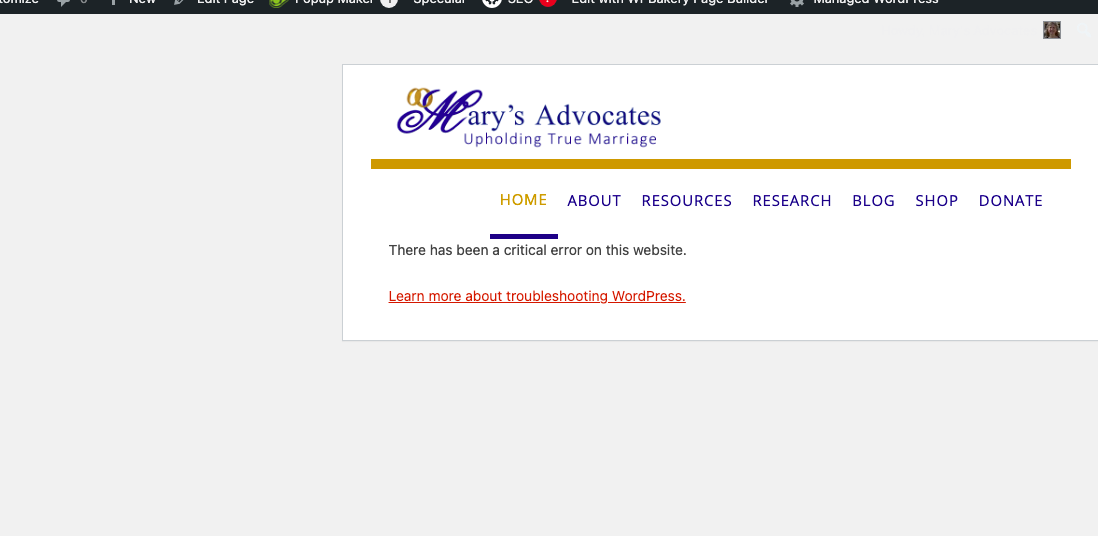
See screen shot of appearance of the homepage with PHP v.8.2 before and after R.V. changed line 241. His changes are shown in above message (8:44 am Ohio time)
broken homepage, prior to R.V.’s change
https://marysadvocates.org/OutsideWordpress/Temp_to_Delete/240319_broken_homepage.pngcorrected homepage, after R.V.’s change
https://marysadvocates.org/OutsideWordpress/Temp_to_Delete/240319_correct_homepage.pngin reply to: Submit comment fields not showingThis reply has been marked as private.in reply to: Submit comment fields not showingThis reply has been marked as private. -
This reply was modified 2 years, 4 months ago by