Forum Replies Created
-
in reply to: Add Facebook Script
thanks for the solution!
in reply to: Add Facebook ScriptThis reply has been marked as private.in reply to: Add Facebook ScriptMirela
Are you able to help me with this?
in reply to: Add Facebook ScriptIn followup to the last reply, please go to this LINK to see the screenshots of the setup. I’m not sure if this is correct and would greatly appreciate your advise. A text link appears in the FOOTER of the website, but the goal is to have the Facebook feed appears there, as described here: https://developers.facebook.com/docs/plugins/page-plugin/
in reply to: Featured Image CaptionWorks like a charm! thanks
Hope you are okay after the earthquake.
in reply to: Add Facebook ScriptI like the idea of adding the code in the Custom JS Code. Thus preserving and not editing the footer.php file. However, when I paste the following into the Custom JS Code:
<div id=”fb-root”></div>
<script async defer crossorigin=”anonymous” src=”https://connect.facebook.net/en_US/sdk.js#xfbml=1&version=v5.0&appId=580653712672929&autoLogAppEvents=1″></script>I get an error that reads:
“Expected an identifier and instead saw “<“. Missing “;” before statement.”Are you able to provide me with the accurate format to place this code?
-
This reply was modified 6 years, 10 months ago by
 dickieassoc.
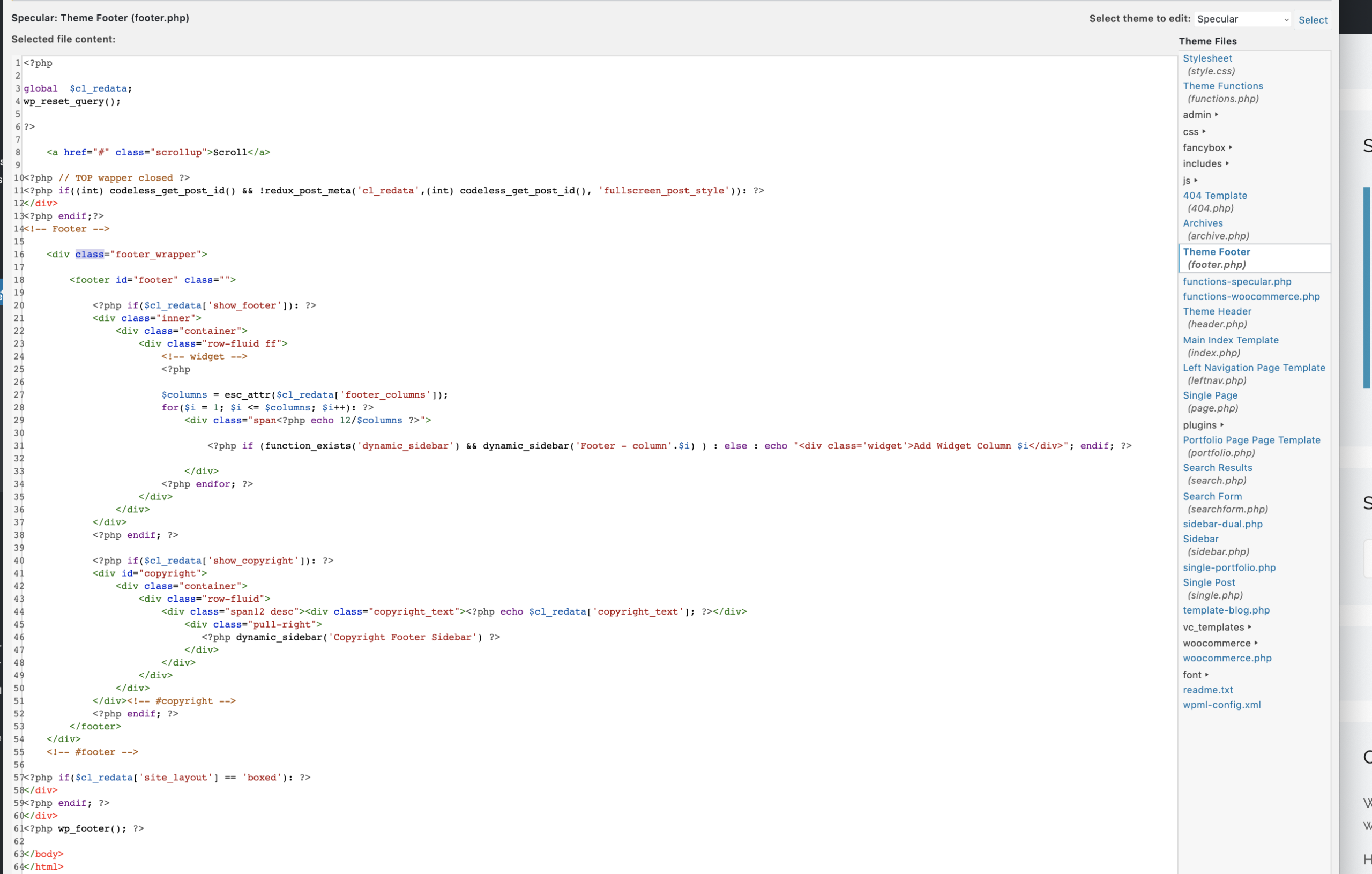
in reply to: Add Facebook ScriptSince there is no opening body tag in the Secular>Theme Footer (footer.php) file, would you please advise where, in the file, I should place the new script. If you could use the attached screenshot and advise by line number where the script should be placed, that would be most helpful.
in reply to: Featured Image CaptionAre you able to respond to my last question posted 5 days ago?
<p style=”box-sizing: border-box; margin: 0px 0px 22px; color: #4b4d4d; font-family: Raleway; font-size: 14px;”>The other option for us would be to embed the image, with caption, in the post body. When we do this, the caption appears. However, ideally we want an image to appear on the Blog Masonry page [ https://planforaction.com/ideas-and-news/ ]. The only way we know to do this is to use the featured image setting. If we do that, the image appears twice on the post [https://planforaction.com/beautiful-brazil-caption-test/]</p>
<p style=”box-sizing: border-box; margin: 0px 0px 22px; color: #4b4d4d; font-family: Raleway; font-size: 14px;”>So the question is, is there a method that allows us to have the image appear on the Blog Masonry page, that allows us to embed the image, with caption, in the post body, and does not allow the image to appear twice in the post?</p>in reply to: Featured Image CaptionThe other option for us would be to embed the image, with caption, in the post body. When we do this, the caption appears. However, ideally we want an image to appear on the Blog Masonry page [ https://planforaction.com/ideas-and-news/ ]. The only way we know to do this is to use the featured image setting. If we do that, the image appears twice on the post [https://planforaction.com/beautiful-brazil-caption-test/]
So the question is, is there a method that allows us to have the image appear on the Blog Masonry page, that allows us to embed the image, with caption, in the post body, and does not allow the image to appear twice in the post?
in reply to: Featured Image Captionfor the plugin you suggested,
the plugin documentation reads:
“In order for automatic captions to work, the theme you are using has to implement the featured image using the one of the WordPress functions the_post_thumbnail() or get_the_post_thumbnail().
If your theme does not support automatic captions as described, you have a couple of options.- Use the
- provided by this plugin, and place it in your theme’s code (or use a
- ) where you would like the caption information to appear.
- Use the
- to insert caption information into the post body.
would you please advise?
-
This reply was modified 6 years, 11 months ago by dickieassoc.
in reply to: Featured Image Captionthanks for the suggestions
in reply to: Link Style Not Working in Bulleted Textthanks – tested and it solved the problem.
in reply to: Link Style Not Working in Bulleted TextWhen I add the Custom CSS code, a yellow, triangular icon appears with an explanation mark to the left of the code. When I mouse over it it reads “Use of !important”
Please advise.
in reply to: Featured Image CaptionIs there a plugin or alternative method of having captions appear for posts using featured image? The featured image is needed when using “Full Blog, Masonry Style” if we want the image to appear – which we do. But, if the caption does not appear, then we need to embed the image in the body of the post content which means it appears twice.
in reply to: Private BlogThanks for your reply, Mahalia!
So the navigation arrows on post pages cannot be limited to a particular category, is that correct? Which would mean that on any post page, if one is navigating using the side navigation arrows, they can navigate through all posts? If that is the case, is there a custom code I can use to turn off the navigation arrows on the post pages?
The custom codes you provided to eliminate the “0 comments” at the bottom of each post and the website menu from the top of each post work perfectly!
-
This reply was modified 6 years, 10 months ago by