Forum Replies Created
-
in reply to: Image Size reducedThis reply has been marked as private.in reply to: Image Size reducedThis reply has been marked as private.in reply to: Image Size reducedThis reply has been marked as private.in reply to: Image Size reducedThis reply has been marked as private.
Hi Azam
I found out myself.
Thank you
Best regards
BerndThis reply has been marked as private.in reply to: Change Portfolio boxed SlideshowWhy is it not possible to link to another post here?
in reply to: Change Portfolio boxed SlideshowHi Azam,
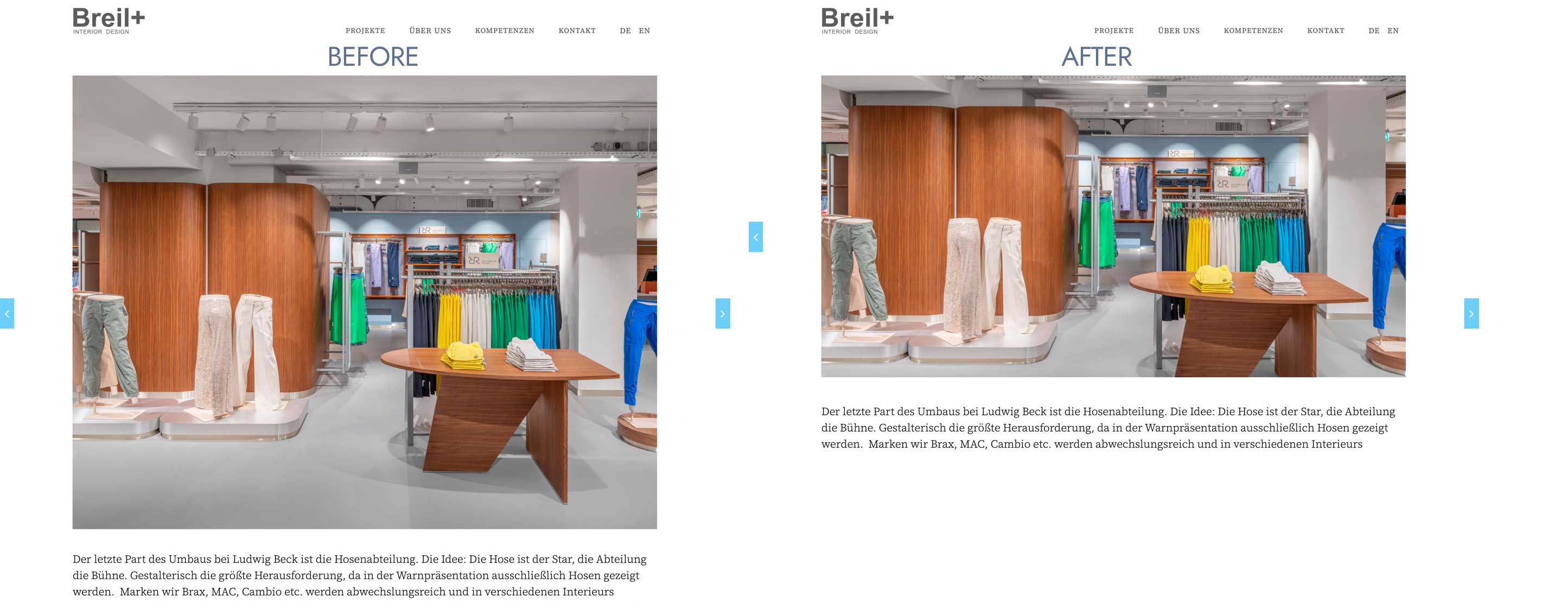
I meant after.But at the moment this is more interesting regarding the same problem:
I try to understand how the size of the images in the slideshow of the portfolios are defined.
In this post I had the same problem:
At that time I changed the ‘blog’ line in the functions.php to 960, 640
and the images came out in that format after I uploaded them again and regenerated thumbnails.function codeless_images_sizes(){
add_image_size( ‘port3’, 600, 600, true );
add_image_size( ‘port3_grayscale’, 627, 470, true );
add_image_size( ‘port2’, 460, 275, true );
add_image_size( ‘port2_grayscale’, 940, 470, true );
add_image_size( ‘port4’, 600, 600, true );add_image_size( ‘blog’, 960, 640, true );
add_image_size( ‘alternate_blog’, 440, 195, true );
add_image_size( ‘alternate_blog_side’, 355, 235, true );
add_image_size( ‘blog_grid’, 350, 350, true );add_image_size( ‘staff’, 400, 270, true );
add_image_size( ‘staff_full’, 500, 340, true );}
If I now change the same line to
add_image_size( ‘blog’, 2048, 1152, true );
the image size shown in the portfolio-slideshows really changes!
So this is the correct answer for my first question in this post.
As I dont use the blog, staff etc my question now is:
Can I then delete these lines:
add_image_size( ‘port3’, 600, 600, true );
add_image_size( ‘port3_grayscale’, 627, 470, true );
add_image_size( ‘port2’, 460, 275, true );
add_image_size( ‘port2_grayscale’, 940, 470, true );
add_image_size( ‘port4’, 600, 600, true );and can I delete the generated images in that sizes?
Thank you for feedback
Berndin reply to: Change Portfolio boxed SlideshowThis reply has been marked as private.in reply to: Change Portfolio boxed SlideshowHello,
I try to understand how the size of the images in the slideshow of the portfolias are defined.
In this post I had the same problem:
At that time I changed the ‘blog’ line in the functions.php to 960, 640
and the images came out in that format after I uploaded them again and regenerated thumbnails.function codeless_images_sizes(){
add_image_size( ‘port3’, 600, 600, true );
add_image_size( ‘port3_grayscale’, 627, 470, true );
add_image_size( ‘port2’, 460, 275, true );
add_image_size( ‘port2_grayscale’, 940, 470, true );
add_image_size( ‘port4’, 600, 600, true );add_image_size( ‘blog’, 960, 640, true );
add_image_size( ‘alternate_blog’, 440, 195, true );
add_image_size( ‘alternate_blog_side’, 355, 235, true );
add_image_size( ‘blog_grid’, 350, 350, true );add_image_size( ‘staff’, 400, 270, true );
add_image_size( ‘staff_full’, 500, 340, true );}
If I now change the same line to
add_image_size( ‘blog’, 2560, 1400, true );
nothing happens, although the format is different (wider).
Also I am not sure if this is really the correct line for that kind of portfolio.
Where can I see which type of portfolio I use (port3, port2, port4, blog, …)If you need login credentials, tell me, as the site is not c´visible to the public yet.
Thank you for feedback
Berndin reply to: Change Portfolio boxed SlideshowHi Azam,
thank you for fast feedback!I think something like that:
https://datagrafik.de/download/breilplus.jpgin reply to: ERROR when updating to 3.3Thank you Ludjon,
That worked!
in reply to: Previous/Next-Buttons Portfolio SlideshowThank you very much Mihaila!
Your help was more than I expected: Great support!
Berndin reply to: Previous/Next-Buttons Portfolio SlideshowGreat job Mihaila!
But there ist still a grey line below the picture and too much room between picture and text.
I tried with code
.slides:after {display: none!important;}then the line was gone and the distance was ok, but the prev/next hover was completely gone…
Thank you for your help!
Berndin reply to: Previous/Next-Buttons Portfolio SlideshowThis reply has been marked as private.