
-
-
Hello.
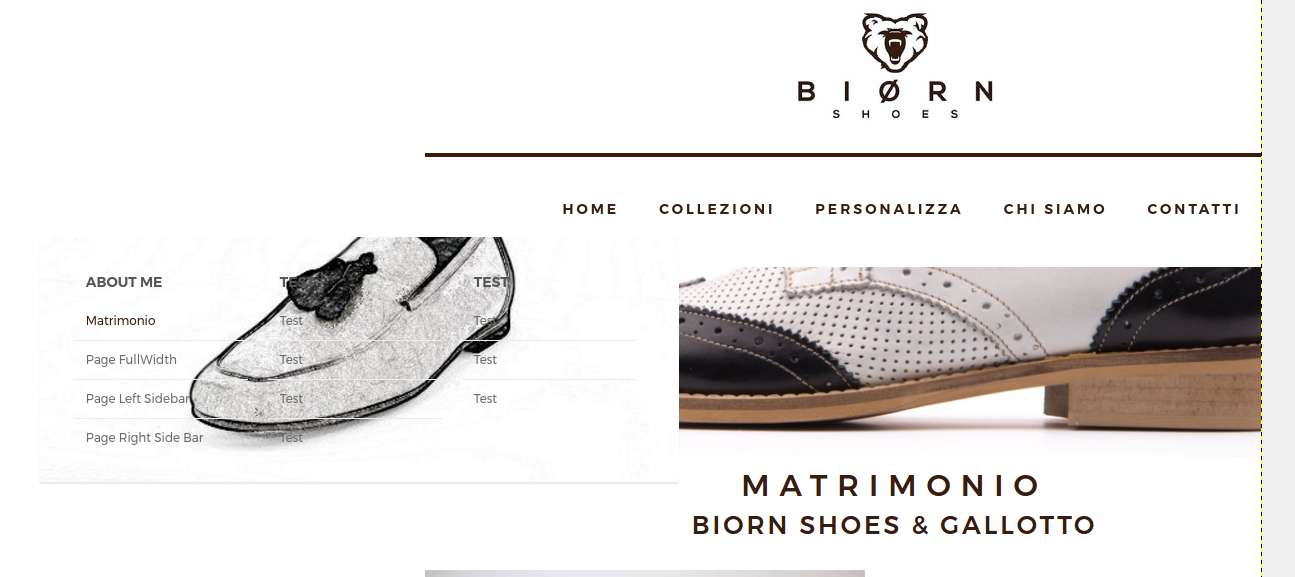
I set it up the mega menu settings, but there are a few problems and missing features.
For example, the dropdown-mega menu is actually on the left side of the website, but it should be centered.
There are no informations on your documentation, and i don’t know how to center the dropdown mega menu.
The missing feature is about adding images in the mega menu, as i can see, i can setup a background image only, and this image is one for every sub menu, i can’t setup an image for each mega menu column.
Screenshot:
https://imageshack.com/a/img923/4018/CJpv7b.png
My site url is biornshoes.wpdev.it
Thanks in advance.
-
Hello,
Sorry but it’s not possible to add images to mega menu.
Add this code into your custom css box (located in General Options) to center the mega menu column titles and menu items:nav .codeless_custom_menu_mega_menu ul>li h6 { text-align: center !important; } nav .menu li ul.sub-menu li a { padding: 11px 58px !important; width: 100% !important; }Let us know.
Best regards!
-
Hello.
Sorry, but your code is not working.
I’ve put the code in style.css (child theme) and then in the theme’s settings, but is still not working.
Thank you.
-
I also have another problem.
If you go on the product page and try to open the mega menu, the product zoom will hide the menu.
Link: https://biornshoes.wpdev.it/prodotto/lorem-ipsum/
Thanks in advance.
-
Hello,
Please fill in the wp login information in the extra information fields of your profile data. So we can give it a closer look to why the code given is not working.
Read this article for more information.
-I checked the product page, did you install any extension for the woocommerce? This type of zoom is not by theme’s default style. (the default style is to zoom image within the image frame, not out of it)
However, your zoom does hide the product description but not the menu (screenshot). This is not really an issue as you can not perform two actions in the same time. If the user is looking the product in detail (zooming), only after finishing this action will he go for the “acquista” option. If it’s out of the product image, the zoom is not active anymore and all options & description will be visible again.Let us know.
Best regards!
-
Hello.
I wrote my admin credentials in my account, you now should see them.
Yes, i’ve a woocommerce zoom plugin.
The problem is not what you described, i will try to explain it point by point.
> open a submenu, in this case “collezioni”
> try to click on every submenu item
> you can’t click because the submenu disappear and the zoom is now active.
The menu already have a higher z-index that the zoom element, but it still not working.
Thank you in advance.
-
Hello,
Sorry but this is a result of the image zoom plugin you installed. It conflicts with theme scripts. If you disable it the issue is not present anymore.
Sorry but we do not support third party plugins.
Read more about support policy here: https://support.codeless.co/?page_id=4207Best regards!
-
Ok, thank you.
But i still waiting a reply for the centered mega menu. Thank you in advance.
Is there any mega menu plugin that i can use with this theme? Thanks.
-
Hello,
To center the mega menu items, the code i already send you does that(screenshot). To change the entire menu drop-down position, add this code:
nav .codeless_custom_menu_mega_menu.codeless_mega3 {
    left: -130px !important;
}
Result screenshot: https://postimg.org/image/92w8plvc1/
you can use any custom plugin for the mega menu. Sorry but i don’t have any suggestion.Best regards!
-


You must be logged in to reply to this topic.