Forum Replies Created
-
in reply to: Submit comment fields not showingThis reply has been marked as private.in reply to: Submit comment fields not showingThis reply has been marked as private.in reply to: Submit comment fields not showingThis reply has been marked as private.in reply to: Submit comment fields not showingThis reply has been marked as private.in reply to: Submit comment fields not showingThis reply has been marked as private.in reply to: Tried to buy support, but got new license instead.
I thought this was envato support.
in reply to: Tried to buy support, but got new license instead.I prefer to be fully refunded for everything I bought on 21 January. I’m concerned that the items in my download area in envato will only cause confusion and trouble. Is there the option for a full refund? If not, what is the next closest thing. Thank you and sorry for the trouble.
in reply to: Tried to buy support, but got new license instead.Here is another link to record of payment/purchase
https://drive.google.com/file/d/1WD0-kiiIVLNebg1VpqJAN_a8H1jh_eOp/view?usp=sharingin reply to: Tried to buy support, but got new license instead.I would like to “return” the items I purchased for a full refund. I don’t need a second license. I don’t need 12 months of support for a second license. Is there a way to reverse a transaction?
This is the screen shot:
https://drive.google.com/file/d/1WD0-kiiIVLNebg1VpqJAN_a8H1jh_eOp/view?usp=sharingThank you,
Baiin reply to: Tried to buy support, but got new license instead.Is there anyway for you to remove the unneeded extra license that is in my download folder? I didn’t need to buy an extra license yesterday. I was only trying to buy support. I already own a license that we got in 2016 and have a working website. I don’t want to be confused in coming months and years to have a second license out there.
in reply to: Inner Row Settings Border not appearThe reason that the inner rows’ borders were not appearing is because the
Inner Rows were not showing the top and bottom border.
These were used for my home-made fake bread-crumbs on research resources.
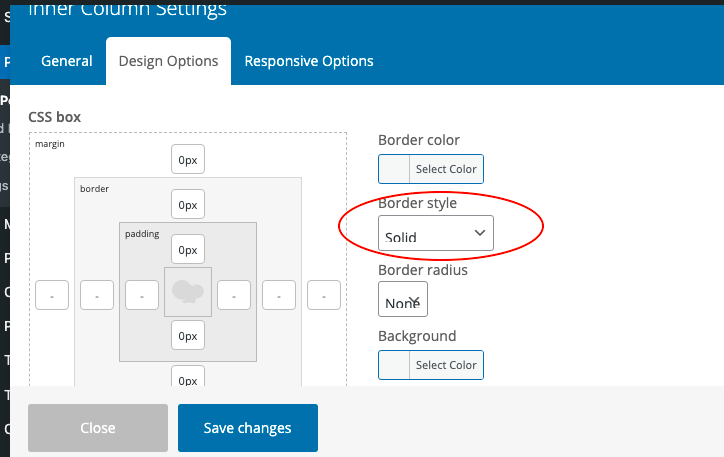
BORDER STYLE has to be set to something besides “theme default.”
When set “border style to “solid” I get the results I want.
see image of setting, here:
https://marysadvocates.org/wp-content/uploads/2023/01/Screen-Shot-2023-01-17-at-3.47.50-PM.pngin reply to: Inner Row Settings Border not appearA feature that was working as expected when I built our website is not working today.
I used to be able to put several inner rows in side another row.
With each inner row, I could manual choose the pixel width of borders, colors of borders, and radius of borders.
That feature is not working when I create a brand new inner row.
Here is screen recording with me showing you the Bakery editing on left and a test page on the right.
The inners rows that are appearing correctly were created by my pasting simple text of code. The rows that are not working were created by me doing (step-by-step) what I did years ago.
Can you duplicate the problem I am having and figure out a correction?
In other words, how can I create a new post, with row containing inner rows AND customized the borders in each inner row? The feature is not working any more.
in reply to: Inner Row Settings Border not appearHello again,
For further explanation about FIRST issue…
When I use a post to issue a blog article, news, or commentary, I want to see author and date. But when I use a post to show research source, I don’t want to see author, date, and tag. If I recall correctly, this something that is controllable on every post, but I now I’m seeing it now on my research info posts.
Other times, in posts, I do want an element that looks sort of like that, but I make it manually myself. I want “Post Navigation Path.” But now this other stuff is appearing (showing author, date, and tag for the post) and I don’t know where it came from. If I know where it came from, that would help.
in reply to: Inner Row Settings Border not appearregarding the SECOND issue,
After going through the four steps that I’ve always done to find Bakery, I was scrolling up and down and found there was something in a thin right colum with a header Bakery. I was able to drag that to above AIOSEO, and it seems to be there in other pages and posts. I’m mystified as to how it got moved to the bottom of a skinny right column.in reply to: Inner Row Settings Border not appearSECOND
For 7 years, I have been able to use the Bakery tool by the following:
1) view page that I’m considering editing
2) click on Edit post at black menu above with white text
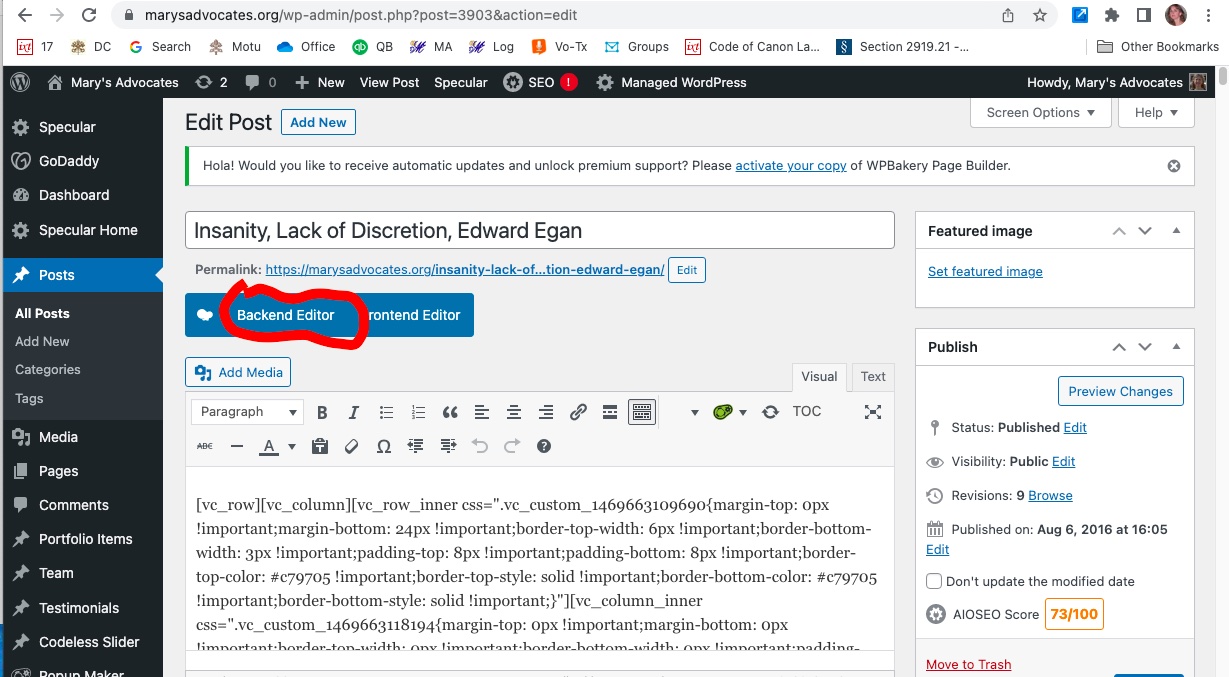
3) click on words “backend editor” to the right of the white chef hat in the blue box,
4) see all the elements (rows)(columns)(buttons) etc in a Bakery box.Now when I do that, nothing happens at all except my editable content disappears and I can’t edit anything at all or see anything at all.
Here is image in which I circle where I’ve always clicked “backend editor.” In Classic Mode, my page or post content is a big wide work space above AIOSEO Settings.
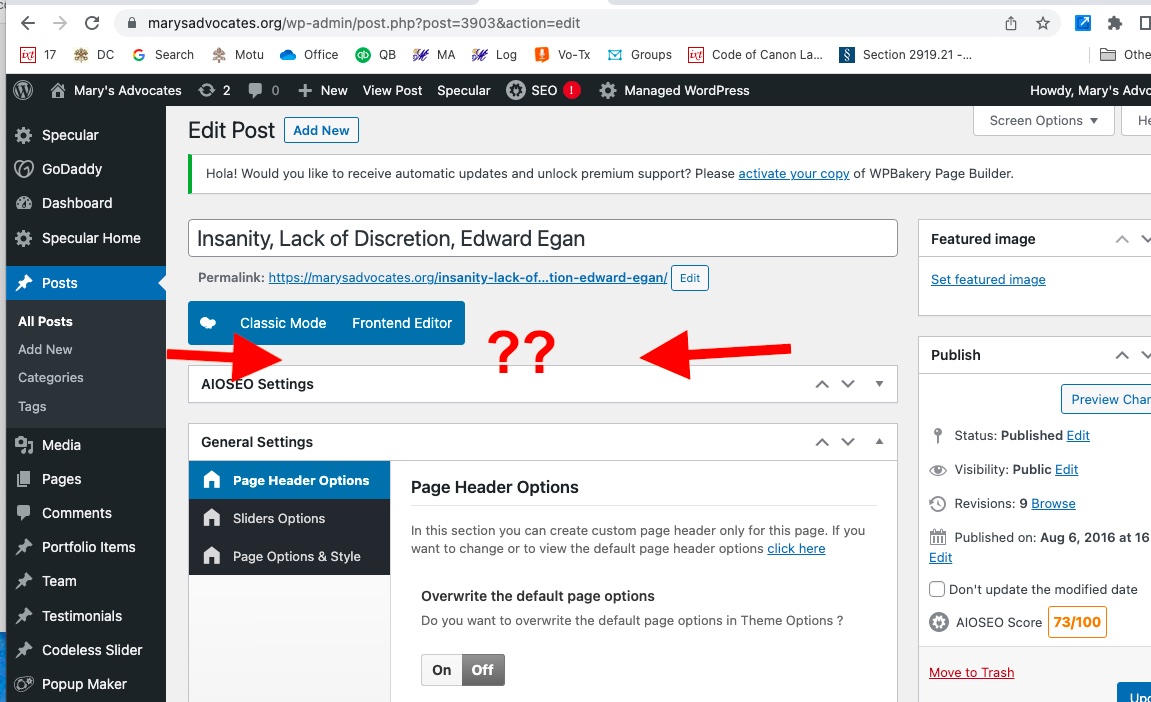
https://marysadvocates.org/wp-content/uploads/2022/12/Screen-Shot-2022-12-24-at-11.24.11-AM.jpgAfter I select the “backend editor,” the content above AIOSEO has disappeared? This has never happened in the seven years that I’ve been using Specular.
Here is a screen shot showing how my content is gone.
https://marysadvocates.org/wp-content/uploads/2022/12/Screen-Shot-2022-12-24-at-11.26.30-AM.jpg