

Forum Replies Created
-
in reply to: WordPress Version 5.0 Specular Gone
I have credit card records that shows my support was bought for six months
June 20, 2018 – Renewed support for 6 months – through December 2018Why are you saying to upgrade to version 1.63 of Specular. Isn’t that going backward? I have v. 2.6.4 now. That’s what I see from Dashboard > Appearance > Theme > Specular > Theme Details.
Is there someplace on the theme’s website that shows me the latest version number not only the update date?
in reply to: WordPress Version 5.0 Specular GoneA team member who is more technically savvy that me end up figuring out how to update WP Bakery. Do you have any instructions on how this is supposed to occur? I thought updating Specular should automatically update WP Bakery.
in reply to: hosting showing update WPBakery Page BuilderIn my wordpress Version 4.9.8, the only way I can find to get to plug-ins is Dashboard > Pluggins. There is no option under Appearance for Plugin.
When I click the button to update the plugin “WP Bakery Visual Composer” I get the error. I showed you screen shot of that error. The link in wordpress takes me to this site . . .
Can I update WPBakery Page Builder if I have purchased it in a theme?
. . . that shows I need to purchase my own license or get update from you.WPBakery Page Builder in Theme VS. Separate License
There’s a difference between getting WPBakery Page Builder directly from us or in a theme. If you purchased from us, this means that you own license and you can access our ticket system and get direct and free updates (instant). If you got WPB in a theme, that means that theme author has a license and only he/she can download latest versions of WPB and include it in the theme. You as a theme user may use WPBakery Page Builder free of charge while you use the theme that came with WPB (because you have a license for that theme).in reply to: hosting showing update WPBakery Page BuilderWhen I click to update pluggins, I get an error message. See screenshot here. I have vague recollections that WpBakery Pagebuilder is only updated when the Specular Theme provides me with updates. Can you refresh my memory.
Is the Layer Slider something that is used to make the top of my homepage ( https://marysadvocates.org/). Is LayerSlider also something that is updated with updates of Specular?
. . . Yikes. When I look at my notes from the weeks when I built our website, I can’t figure out how I made the slider on the homepage. When I edit the home page, I see General Settings > Slider Options> Select Slider type > Codeless Slider. Plus, I see General Settings > Slider Options > Select One of the Created Codeless Slider Option > Home Slider 160811. I would have named a slider with 160811 as part of the name. Because I haven’t thought about this in a couple years, can you give my your opinion. I know that the only page on my website that uses slider is the homepage. Would you agree that I can simply disable the slider pluggin “Layer Slider WP”? Or is the Layer Slider WP something that is needed for “Codeless Slider” to function?
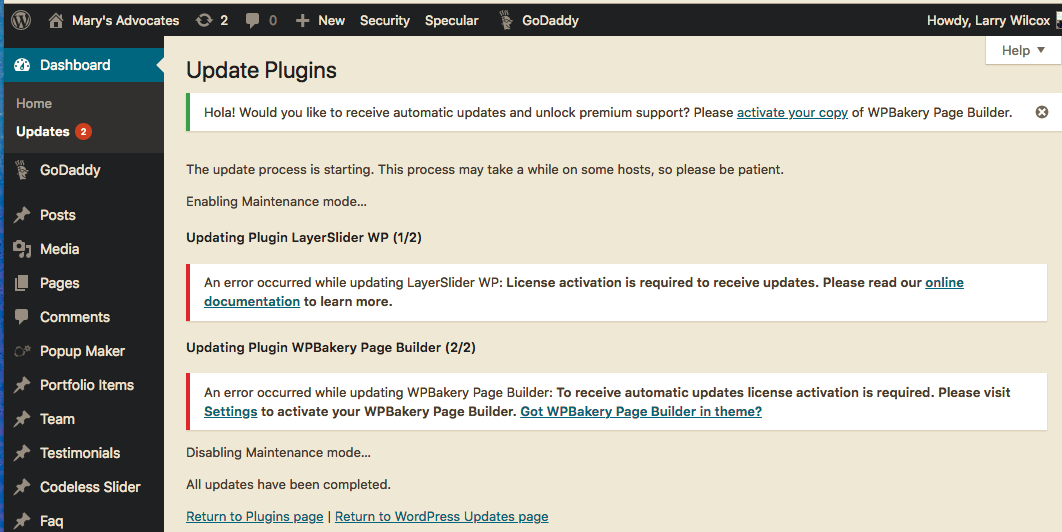
 in reply to: hosting showing update WPBakery Page Builder
This screen shot of menu > Envato Market > leads me to conclude there is no update of them “Specular” available. Do you know if Envato Market is working correctly?
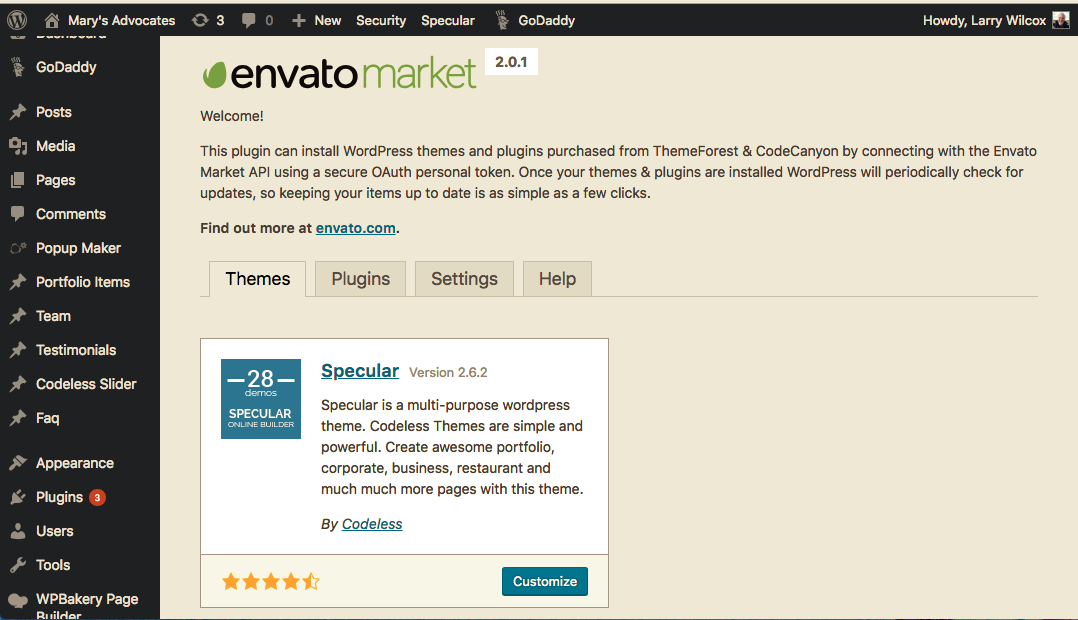
 in reply to: hosting showing update WPBakery Page Builder
Hi again,
I’m using SpecularVersion: 2.6.2. On Appearance > Themes > Specular > Theme Details, I don’t see anything indicating that there is a new version of specular available.
How do I find out whether or not there is a never version of theme?
Thanks
Baiin reply to: Gutenberg, wordpress new editor with SpecularHi again,
I definitely don’t want to go through the learning curve of using some other content builder. I’m pleased to stick with WP Bakery Visual Composer. My wordpress site is hosted with a company that updates WordPress for me automatically. I’m trying to figure out whether, one day, I’m going to discover that Specular doesn’t work or that WP Bakery doesn’t work because wordpress took over and is forcing me to use Gutenberg.
My specific question is this: Is there something I have to do to continue using Specular and WP Bakery Visual Composer when my worpress gets updated automatically?
Thanks
Bai
-
This reply was modified 8 years ago by
 baimac.
in reply to: WP Bakery Page Builder BROKEN HOMEPAGEI deleted the code that was at the beginning of the post/page that was before [vc_row][vc_column. . ..
Though I have no idea where that code came from. The issue is resolved now.
Thanks
Bai
in reply to: WP Bakery Page Builder BROKEN HOMEPAGEThis reply has been marked as private.in reply to: WP Bakery Page Builder BROKEN HOMEPAGEThis reply has been marked as private.in reply to: WP Bakery Page Builder BROKEN HOMEPAGEAfter following your instructions for update, the problem is still there. Is there some other way to edit the homepage that I don’t know about?
I now see on the
Dashboard > Appearances > Themes > SpecularVersion: 2.6.2
Dashboard > Plugins > Installed Plugins > WPBakery Page Builder > Version 5.4.7Bai
in reply to: WP Bakery Page Builder BROKEN HOMEPAGEI’m using
WPBakery Page Builder 5.4
SpecularVersion: 2.6.1
The issue is not occurring on other pages or posts, only on the homepage.
Thanks,
Baiin reply to: short code in Visual composer – brokenThe icons have the option of showing 2-lines, I learned, by clicking the icon to the left of the “CL”. When hovering over the box, the text “toggle toolbar” appears.
So this topic is closed. My other topic about the excerpts in all my posts disappearing still needs an answer.

 in reply to: short code in Visual composer – broken
Are you saying it is not possible to have two rows of icon commands in Virtual Composer’s Text editor? Do you know if two-rows were in previous version of Virtual Composer, and are now gone?
You wrote that I should still have the paragraph drop down option. What do you mean by “Please deactivate third party plugins (the green icon after CL) and try again”?
I don’t know what the icon to the right of the CL is for and I don’t know what made it appear. When I hover over it, it shows “popup maker shortcodes.”
Yesterday, I deactivated all my plugins, deleted Specular, reloaded specular, and activated all my plugins. I can’t understand why repeating the same identical process would give a different result and bring back the paragraph drop down menu.
in reply to: short code in Visual composer – brokenI deactivated all pluggins, uploaded theme again, and the original problem that started this thread appears to be resolved.
But there is a new problem. I used to have two lines of icon-commands when editing text. Shown here is a screen shot of what I userf to see, though partially covered with CL menu.


Now I only see one line of commands. I especially need the pull down menu for paragraph or heading setting for text.


How do I bring back the two lines of icon-commands in text editing in the virtual composer?
-
This reply was modified 8 years ago by

