Forum Replies Created
-
in reply to: Cart Layout, Buttons, & Product Typography
Hello,
The js/main.js file is inside the Tower theme folder. But you have to access it using a ftp or cpanel. It is not listed under Appearance > Editor list of files. See screenshot.
Actually this situation does not happen on our side as we speak, but we will make more tests for it and include any possible change in future updates if needed.
Best regards!
in reply to: Testimonial SpeedHello,
There is no need to edit the js files anymore. The testimonials element already has the speed option in it’s option panel. Just make sure you have both theme and Visual Composer updated to their latest released versions. Then open “Testimonial” element and add a speed value to it.
See screenshot: https://pho.to/AgiU4Best regards!
in reply to: PHP Incomplete WarningHello,
Please go to your wordpress root folder and find file wp-config.php. Add this line:
define('WP_DEBUG', false);
If it is already present then make sure it is set to “false”.
Let us know.Best regards!
in reply to: Post Grid settings – narrow data source not workingHello,
If you are experiencing difficulties saving changes in your wordpress site, then you have to check your wp installation and database. This is mostly a server issue.
Please check with your host provider that you have all necessary rights to make changes to theme files / database and enough memory available. Also performing a database repair operation can help.
If the issue persists, disable all third party plugins, clear cache and cookies and try again.Let us know.
Best regards!
in reply to: Envato TokenHello,
The current theme version is Tower 2.1.
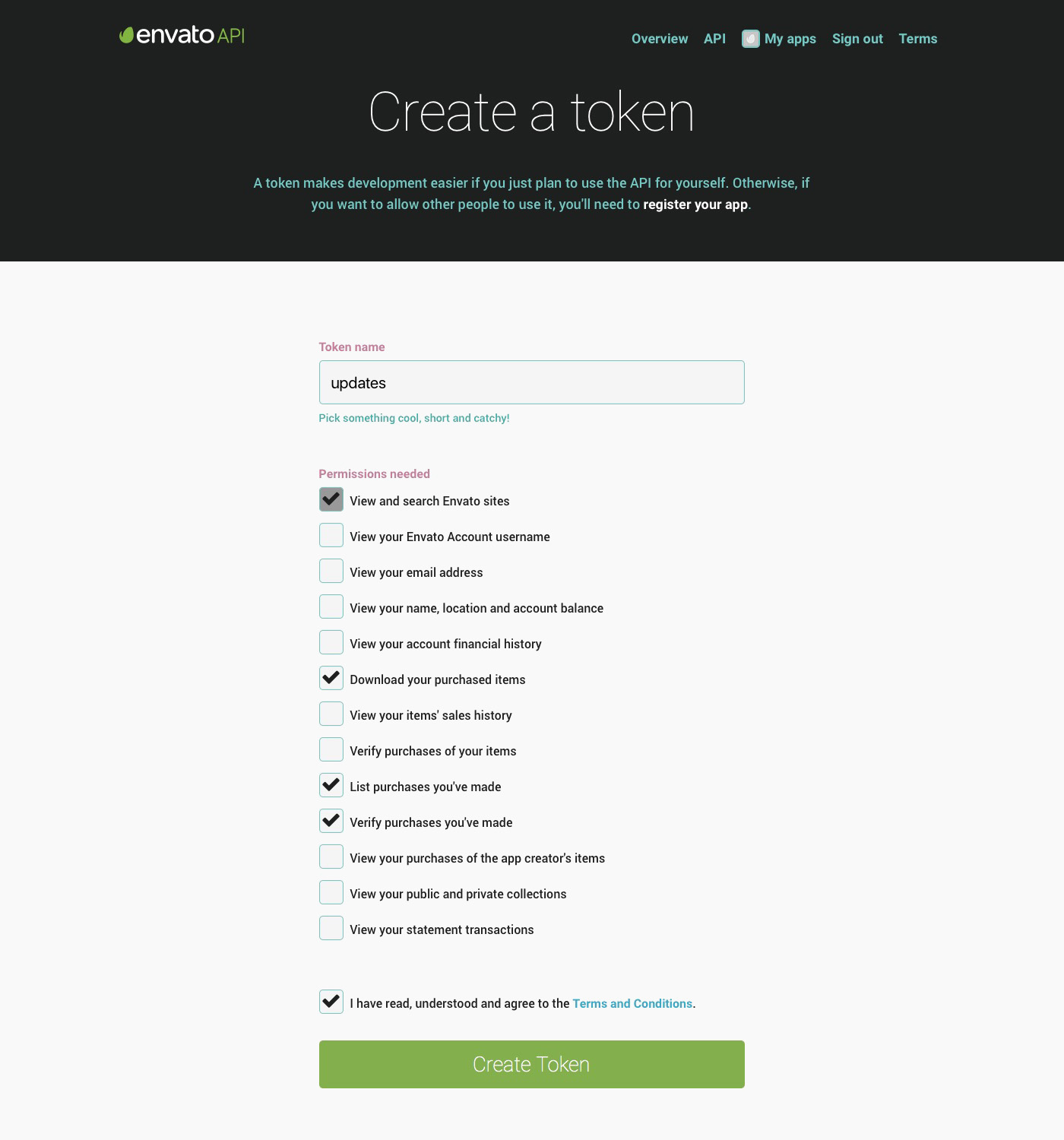
Are you sure you have created correctly the Envato token? Please follow again the steps in generating a new key (follow the steps explained here) Please make sure to have the access rights checked as instructed here: https://www.wpexplorer.com/wp-content/uploads/generate-envato-api-token.jpgYou can add the same Secret API key into your “Envato Toolkit” plugin and try here too.
I can try updating it, but i need your permission for it. Are you sure you want to update theme? Did make any custom changes to it’s files directly? If you did and then update them, all those changes will be overwritten. We strongly suggest saving a copy of you current theme files before any update.
Let us know.
Best regards!
in reply to: Portfolio Sorting MissingYou’re welcome!
Let us know if you need further help.Best regards!
in reply to: How to authorize the siteHello,
All the included plugins, Visual Composer too, have extended licenses. This means they can be used by any one purchasing our theme as long as they use the version included in theme folder.
Watch this video tutorial on how to install and activate plugins from theme.
You can not update it on your own terms with this type of licence.
The rules of the marketplace doesn’t allow us to give the plugin activation code. You can use the existing version without any problem. We update frequently all theme plugins to their latest versions in every theme release or in case when an urgent update is needed. So they are always fully compatible with the current theme version.If you want to buy a license by yourself this is allowed, but we thought that this isn’t needed because the version included works perfectly.
You are free to make the choice that best fits your needs.Best regards!
in reply to: codeless slider endlessHello,
To make the slider scroll infinitely (not stop at the last slide), please go to file js/main.js and find these lines:
$('.codeless_slider').imagesLoaded(function(){
		$loading.css('display', 'none');
		var c_speed = $('.codeless_slider').data('speed');
		if(c_speed == 'undefined')
			c_speed = 800;
		codelessSlider = new Swiper('.codeless_slider',{
			slidesPerView: slide_per_view,
			paginationAsRange: false,
			loop: false,
Edit out the “
loop: false,” to “loop: true,”
Save changes and refresh page.Best regards!
in reply to: "menu link underline"Hello,
Sorry for the late reply.
Please fill in the necessary information on the extra information fields of your profile data. So we can give it a closer look.Read this article for more information.
Best regards!
in reply to: Visual Composer – Tower ThemeHello,
Yes, many of Visual Composer elements have been altered in order to fit better the style of this theme. To add back elements, just go to file includes/core/codeless_elements.php. You will find at the top of the file all VC elements listed. To add them back, just comment out the
vc_remove_element();functions. Example:
From this:vc_remove_element("vc_button");
to this://vc_remove_element("vc_button");To completely remove the included version and instead use the standard, please refer to this topic regarding it: https://support.codeless.co/?topic=slow-page-loading-time
Let us know.
Best regards!
in reply to: Cart Layout, Buttons, & Product TypographyHello,
1-I can not be sure which file did you edit, but the responsible file for the cart is located into the plugins folder. Check this out:
wp-content\plugins\woocommerce\templates\cart\cart.php
I suggest you contact the developer that first made the changes. I am sure they will be able to help you.3-Please go to file js/main.js and add these lines:
$(window).load(function () {
    codelessOverallButton();
});
Right after these lines:
$(window).load(function () {
	codelessInitParallax();
});
Let us know.
Best regards!
in reply to: Responsive Menu Dropdown OffHello,
This is the Extra Side Navigation. You can find it in General Options > Layout > Extra Side Navigation. Just set the option OFF, to remove it.
Even though they have the same icon, the mobile menu and extra navigation are not the same thing. The extra navigation is an additional sidebar. As such you can add content into it using widgets. Just go to your Appearance > Widgets and add widgets to “Extra Side Navigation”.
To remove it, set it off as instructed above.
Let us know.Best regards!
in reply to: Envato TokenHello,
Please make sure to have checked the “Download your purchased items” option in the rights list when you create your Token.
If this too fails, then use the Envato Toolkit plugin. Let us know.Best regards!
in reply to: Self Hosted Video in Service MediaHello,
Please go to file vc_templates/services_media.php and find these lines:
if(!empty($self_hosted_mp4)){
      $output .= '<video autoplay controls> <source src="'.trim($self_hosted_mp4).'"  type="video/mp4"></video>';
}
Remove the “autoplay” from it and save.
Let us know.Best regards!
in reply to: facebook share from postHello,
I tried sharing one of your blog posts, and when i click on the shared link in my fb profile, it does take me to the post page.
please try again and let us know.Best regards!