

Forum Replies Created
-
in reply to: Width of pages are changing when changing the title.
Hi Mihaila,
It appears on all pages.
Sorry but i cant find the Codeless Builder plugin. I tried downloading the zip file from themeforest, but where is it located?The theme is up to date
-
This reply was modified 7 years, 7 months ago by
 imme.
imme.
in reply to: Width of pages are changing when changing the title.Hi!
Im getting back to you regarding this bug as I was hoping for it to be fixed but it still remains and it makes it impossible to update the website without editing all the textes everytime i want to uptade the pages ( It drives us crazy).
Please check the videos i made with Loom:
Encountering the problem (Also notice that when i click “Duplicate” i only get an empty element):
https://www.useloom.com/share/c6fb681e1f534fde9b73048c09c11e26
Only solution to get back the dissapearing text (by adding SOMETHING to all the titles or text):
https://www.useloom.com/share/31be6d7d4b8447699f581f0c07335920
Best regards,
Kimin reply to: Language on search screenHi!
Did you add any function to change the language of the “SEARCH” ?
BR,
Kim-
This reply was modified 7 years, 7 months ago by imme.
in reply to: place custom codeHi,
I already have a chat service. And ive gotten their code looking like below.
How do I implement this on my website?
<div dir="ltr" style="padding-top: 0px; border-top: 0px;">
<div class="WordSection1" style="page: WordSection1;">
<p class="MsoNormal" style="margin: 0cm 0cm 0.0001pt; font-size: 11pt; font-family: Calibri, sans-serif;"><script type="text/javascript"></p>
<p class="MsoNormal" style="margin: 0cm 0cm 0.0001pt; font-size: 11pt; font-family: Calibri, sans-serif;">(function(d, src, c) { var t=d.scripts[d.scripts.length - 1],s=d.createElement('script');s.id='la_xxxxxxx';s.async=true;s.src=src;s.onload=s.onreadystatechange=function(){var rs=this.readyState;if(rs&&(rs!='complete')&&(rs!='loaded')){return;}c(this);};t.parentElement.insertBefore(s,t.nextSibling);})(document,</p>
<p class="MsoNormal" style="margin: 0cm 0cm 0.0001pt; font-size: 11pt; font-family: Calibri, sans-serif;">'https://psservice.liveagent.se/scripts/track.js',</p>
<p class="MsoNormal" style="margin: 0cm 0cm 0.0001pt; font-size: 11pt; font-family: Calibri, sans-serif;">function(e){ LiveAgent.createButton('5015fcaf', e); });</p>
<p class="MsoNormal" style="margin: 0cm 0cm 0.0001pt; font-size: 11pt; font-family: Calibri, sans-serif;"></script></p></div>
</div>-
This reply was modified 7 years, 8 months ago by imme.
in reply to: Where is the link function?Ruco!
Please do add this function as its very important to be able to link the phone number (tel:) in the mobile version these days. Its highly recomended to do so by the google team.
I will, ofcourse, link the email too(mailto:).
If there is any way around it id much appreciate your help.
Best regards,
Kimin reply to: Language on search screenHi!
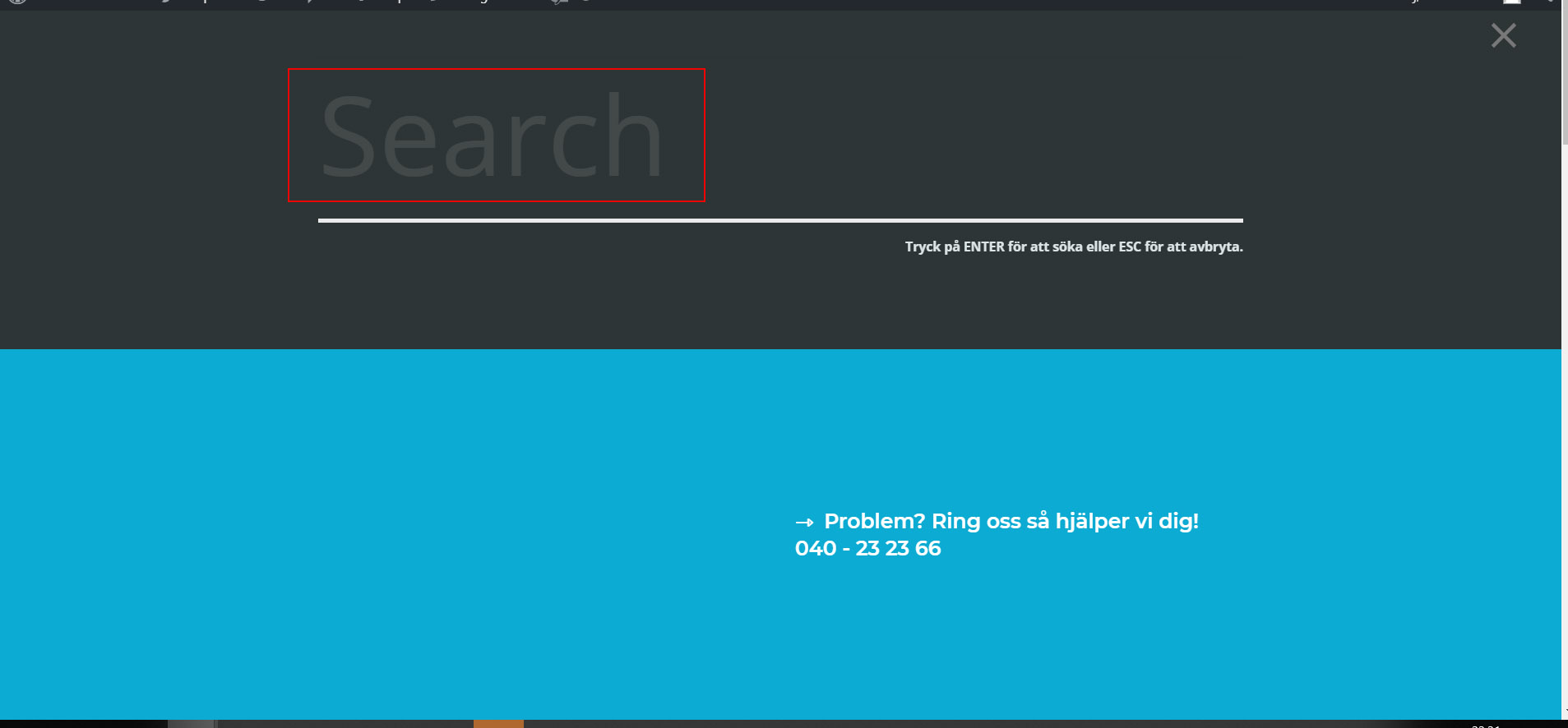
I managed to translate most of that page BUT not the word “Search” in the text field. Must be static in a php file, or?
Please have a look:
 in reply to: Language on search screen
I take advantage to ask you another question as well:
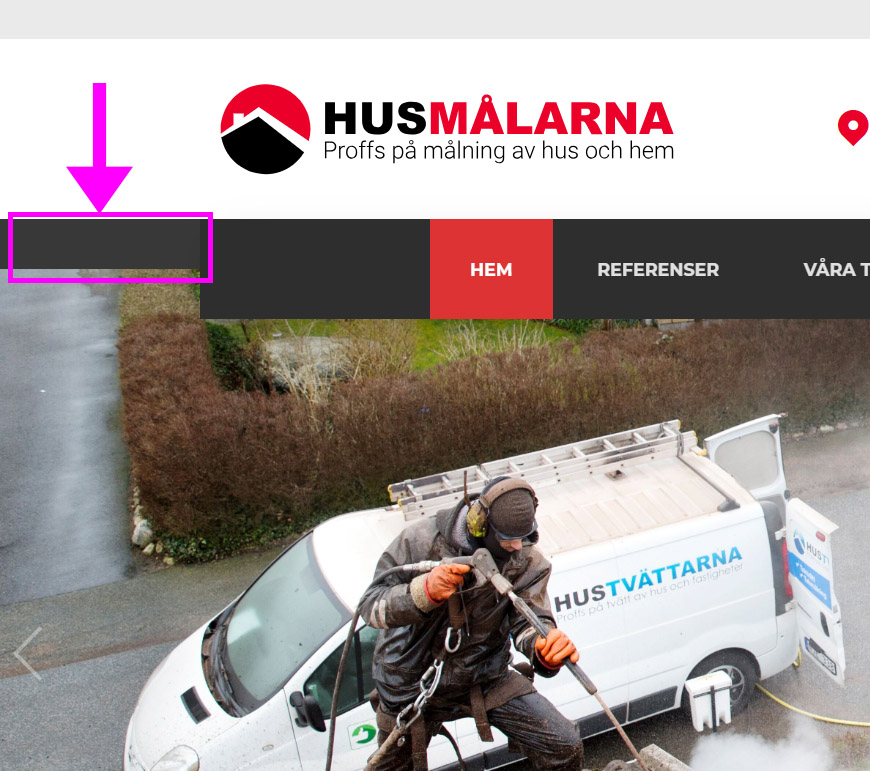
On each side of the menu there is this dark section going in the background. How do i change the color of this one? I Want it white as the rest of the background.
 in reply to: Language on search screen
Hi Ruco,
Sorry but what article? :)
in reply to: Website down – problem w kirki?Thank you. The new version of handel worked fine!
in reply to: Website down – problem w kirki?Hi!
Its the Handel theme that im using.
in reply to: Contact form thank you message.
-
This reply was modified 6 years, 8 months ago by imme.
in reply to: Contact form thank you message.
-
This reply was modified 6 years, 8 months ago by imme.
in reply to: Contact form thank you message.
-
This reply was modified 6 years, 8 months ago by imme.
in reply to: Button Opens Page in New WindowHello!
How do i add the target _blank to specific buttons? I dont want all of my buttons to open in a new window just a few.
Regards,
Kim
in reply to: Responsive footerHi!
Thank you for your reply.
I manage to remove the first with your code but the others I cant get rid of. I changed “first” to “second” and so on. What am I doing wrong?
I’d like to remove second, third and fourth columns.
Is it possible to style all 4 columns for the mobile device? I could not find it thats why i wanted to hide them instead.
Regards,
Kim
-
This reply was modified 7 years, 7 months ago by

