

Forum Replies Created
-
in reply to: Need CSS code for tags
Hi,
Sorry for the inconvenience, but the following code should work now:
.single-product.woocommerce .product_meta .tagged_as a {
display: none;
}I’ve added this code in the custom code field. Please check and advise.
Thanks,in reply to: How can i make links of different colorHi,
By adding a custom class to that link you can add your own custom styling only on that specific link.Thanks,
in reply to: Erzen portfolio page :(You’re welcome :)
If you like our theme and support, leave us a 5-star rating on Themeforest, it’s very important for us :)
https://themeforest.net/downloads
Thank You so much
in reply to: Erzen portfolio page :(Hi,
Thanks for your suggestion, I hope we’ll add this to our theme documentation in our theme’s next update.Thanks,
in reply to: Need CSS code for tagsHi,
For a single product page, you can use the following code to hide tags:
.single-product.woocommerce .product_meta .posted_in a {
display: none;
}Please check and advise.
Thanks,in reply to: Erzen portfolio page :(This reply has been marked as private.in reply to: Erzen portfolio page :(This reply has been marked as private.in reply to: Fatal error for revolution sliderHi,
The error was coming because of the very old version of Slider revolution plugin. Now I’ve updated the plugin.Please check and advise.
Thanks,in reply to: Portfolio Items issuesHi,
– Height of Images
Images height is not equal because all images have different sizes. Make sure you’ve to set images of the same size.– Link Icon
There’s no such option in theme to do this but if you don’t want it you can hide it through CSS.Add the following code in Appearance > Customize > General > Custom Codes
.portfolio-style-only_media .icons-wrapper a.entry-link.lightbox{ display: block; left: 0px;}
.portfolio-style-only_media .icons-wrapper a.entry-link{display: none;}P.S: In the future, if you wanna display this link icon you can display it by removing the above CSS code.
Thanks,
in reply to: Horizontal scroll and mouse hoverHi,
– Horizontal Scroll
This issue might be due to some conflict between our theme and elementor new version code. So, we request you to please downgrade your elementor plugin.
You can downgrade your elementor plugin through
Dashboard > Elementor(in sidebar) > Tools > Version Control > Rollback version > select version 3.0.16 or prior(in case it won’t work) > Reinstall it > Save changes > Done.
P.S: Don’t try to update the Elementor plugin after the downgrade.– Zoom effect on the portfolio image
You can change the zoom effect settings through
Edit page with Elementor > Click on the edit icon on the widget(that particular sontent area) > Item layout/style > select style simple or any other you would like > Update > Done.Thanks,
in reply to: Erzen portfolio page :(Hi,
Sorry for the inconvenience,
1- How to manage portfolio page:
The isotope filters with portfolio are actually portfolio categories from:
wp-admin > Portfolio > Portfolio Categories5- Responsive text:-
On elementor Page editor:
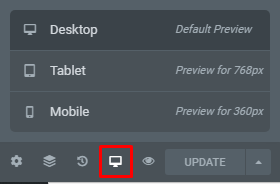

Favicon:
The favicon working pretty fine on my side (A logo/png of a black circle).Please advise.
Thanks,in reply to: Isotope Filters DoubtHi,
The isotope filters with portfolio are actually portfolio categories from:
wp-admin > Portfolio > Portfolio CategoriesPlease advise.
Thanks,in reply to: Horizontal scrollHi,
Please share website URL, wp-admin, and FTP info (login/ passwords) and send using “private reply”.Thanks,
in reply to: FatalError: Uncaught Error: Class ‘CodelessTwitter’Hi,
Please check and let me know,
P.S: There was a small code conflict, I just remove that conflict. It won’t affect the functionality of the site.Thanks,
in reply to: Erzen portfolio page :(This reply has been marked as private.